👥 Clients Management / إدارة العملاء
Complete Client Lifecycle Management with Advanced Filtering & Control Features / إدارة دورة حياة العملاء بالكامل مع ميزات التصفية والتحكم المتقدمة
📋 Overview
The Clients section displays all clients in your database and provides comprehensive management capabilities including adding, removing, assigning units, monitoring payments and installments, and exporting data (with appropriate permissions). This powerful interface enables complete client lifecycle management with advanced filtering and control features.
📋 نظرة عامة
قسم العملاء يعرض جميع العملاء في قاعدة بياناتك ويوفر إمكانيات إدارة شاملة تشمل الإضافة، الحذف، تعيين الوحدات، متابعة الدفعات والأقساط، وتصدير البيانات (حسب الصلاحيات). تتيح هذه الواجهة القوية إدارة دورة حياة العميل بالكامل مع ميزات تصفية وتحكم متقدمة.
🏢 Complete Client Management
Here you can view all your clients and perform essential management tasks:
- Add new clients to your database
- Remove existing clients when necessary
- Assign or remove unit assignments
- Monitor payments and installment schedules
- Export client data (with proper permissions)
🏢 إدارة العملاء الشاملة
يمكنك هنا عرض جميع العملاء لديك وتنفيذ المهام الإدارية الأساسية:
- إضافة عملاء جدد إلى قاعدة البيانات
- حذف العملاء الحاليين عند الحاجة
- تعيين أو إزالة الوحدات للعملاء
- متابعة الدفعات وجداول الأقساط
- تصدير بيانات العملاء (حسب الصلاحيات)
🔍 Advanced Search System
The Client Filters system uses "AND" logic, meaning ALL selected criteria must be met simultaneously. For example, if you filter for clients with apartments AND select a project that only has villas, you will get no results.
🔍 نظام البحث المتقدم
يعمل نظام مرشحات العملاء بمنطق "و" (AND)، أي يجب تحقق جميع المعايير المحددة في نفس الوقت. على سبيل المثال، إذا قمت بتصفية العملاء الذين لديهم شقق واخترت مشروعًا يحتوي فقط على فيلات، فلن تحصل على نتائج.
🔍 Practical Filter Options
🔍 خيارات التصفية العملية
👨💼 Salesman
Select the specific person who manages the broker company that brought the client. This helps track which salesperson is responsible for broker relationships and client management.
👨💼 رجل المبيعات
اختر الشخص المسؤول عن شركة الوساطة التي جلبت العميل. يساعد ذلك في تتبع مندوب المبيعات المسؤول عن علاقات الوسطاء وإدارة العملاء.
🏢 Broker
Filter by the specific broker company that brought the client. This is essential for tracking client sources and managing broker relationships and commissions.
🏢 الوسيط
تصفية حسب شركة الوساطة التي جلبت العميل. هذا ضروري لتتبع مصادر العملاء وإدارة علاقات الوسطاء والعمولات.
📅 Creation Date (From/To)
Filter clients based on when they were added to the system. This temporal filtering helps analyze client acquisition patterns and track business growth over specific periods.
📅 تاريخ الإنشاء (من/إلى)
تصفية العملاء بناءً على تاريخ إضافتهم للنظام. تساعد هذه التصفية الزمنية في تحليل أنماط اكتساب العملاء وتتبع نمو الأعمال خلال فترات محددة.
🏗️ Projects
Filter clients by specific projects they are associated with. This helps you focus on clients interested in particular developments.
🏗️ المشروعات
تصفية العملاء حسب المشروعات المرتبطة بهم. يساعدك ذلك على التركيز على العملاء المهتمين بتطويرات معينة.
🔢 Lead Code
Search by the automatically generated unique, non-repeatable number assigned to each client. This code serves as a permanent identifier for tracking and reference purposes.
🔢 كود العميل المحتمل
البحث برقم فريد يتم إنشاؤه تلقائيًا ولا يتكرر لكل عميل. يُستخدم هذا الكود كمُعرّف دائم لتتبع العملاء والرجوع إليهم.
👥 Broker Agent
Filter by the specific salesperson within the broker company who is following up with the client. This helps track individual broker agent performance and client relationships.
👥 وكيل الوسيط
تصفية حسب مندوب المبيعات داخل شركة الوساطة الذي يتابع العميل. يساعد ذلك في تتبع أداء وكلاء الوسطاء الفرديين وعلاقات العملاء.
� Client Journey Stages - Steps Filtering
Filter clients based on their current stage in the sales process:
� مراحل رحلة العميل - تصفية الخطوات
تصفية العملاء حسب المرحلة الحالية في عملية البيع:
Clients who have been shown units
Clients with units on hold
العملاء الذين تم عرض وحدات لهم
العملاء الذين لديهم وحدات محجوزة مؤقتًا
Clients who have made reservations
Clients with confirmed reservations
العملاء الذين قاموا بالحجز
العملاء الذين تم تأكيد حجزهم
Clients who have made down payments
Clients with confirmed down payments
العملاء الذين دفعوا دفعة مقدمة
العملاء الذين تم تأكيد دفعتهم المقدمة
Clients in contract stage
Clients ready for unit delivery
العملاء في مرحلة العقد
العملاء الجاهزون لتسلم الوحدة
🏢 Broker-Specific Filtering
🏢 التصفية الخاصة بالوسطاء
🔄 Broker Steps
Filter based on broker-specific process stages:
- Hold: Broker-managed holds
- Contract: Broker-managed contracts
🔄 خطوات الوسيط
تصفية حسب مراحل العمليات الخاصة بالوسيط:
- حجز مؤقت: الحجوزات المؤقتة التي يديرها الوسيط
- عقد: العقود التي يديرها الوسيط
🏗️ Broker Projects
Filter by specific projects that are assigned to or managed by particular brokers.
🏗️ مشروعات الوسيط
تصفية حسب المشروعات المخصصة أو التي يديرها وسطاء محددون.
⚠️ Critical Action Buttons
⚠️ أزرار الإجراءات الحرجة
🔒 RESET & SEND NEW CREDENTIALS Button
This is an extremely sensitive and powerful function that requires careful consideration before use. When clicked, this button will:
- Change passwords for ALL clients in the system simultaneously
- Log out ALL clients from the system immediately
- Send new password emails to ALL clients
- Reset all client access credentials across the entire database
🔒 زر إعادة تعيين وإرسال بيانات اعتماد جديدة
هذه وظيفة حساسة وقوية للغاية تتطلب دراسة دقيقة قبل الاستخدام. عند الضغط عليها:
- يتم تغيير كلمات مرور جميع العملاء في النظام دفعة واحدة
- يتم تسجيل خروج جميع العملاء فورًا
- يتم إرسال رسائل بريد إلكتروني بكلمات المرور الجديدة لجميع العملاء
- يتم إعادة تعيين جميع بيانات الدخول للعملاء في قاعدة البيانات بالكامل
📊 EXPORT Button
This function allows you to download client data in your preferred format, provided you have the appropriate permissions. The export capability supports various data formats and comprehensive reporting needs.
📊 زر التصدير
يتيح لك هذا الزر تنزيل بيانات العملاء بالتنسيق الذي تفضله، بشرط توفر الصلاحيات اللازمة. تدعم خاصية التصدير تنسيقات بيانات وتقارير متنوعة.
🏠 EXPORT SOLD UNITS Button
This specialized export function allows you to extract data specifically for sold units, providing detailed information about completed sales transactions and unit delivery status.
🏠 زر تصدير الوحدات المباعة
يتيح لك هذا الزر استخراج بيانات خاصة بالوحدات المباعة فقط، مع تقديم معلومات تفصيلية حول الصفقات المكتملة وحالة تسليم الوحدات.
💡 Best Practice Recommendation
Always test filter combinations with smaller datasets first, and ensure proper mail server configuration before using the credential reset function. Use export functions regularly for data backup and analysis purposes.
💡 توصية أفضل الممارسات
اختبر دائماً تركيبات المرشحات مع مجموعات بيانات أصغر أولاً، وتأكد من التكوين الصحيح لخادم البريد قبل استخدام وظيفة إعادة تعيين بيانات الاعتماد. استخدم وظائف التصدير بانتظام لأغراض النسخ الاحتياطي وتحليل البيانات.
📱 Interface Screenshots
📱 لقطات شاشة الواجهة
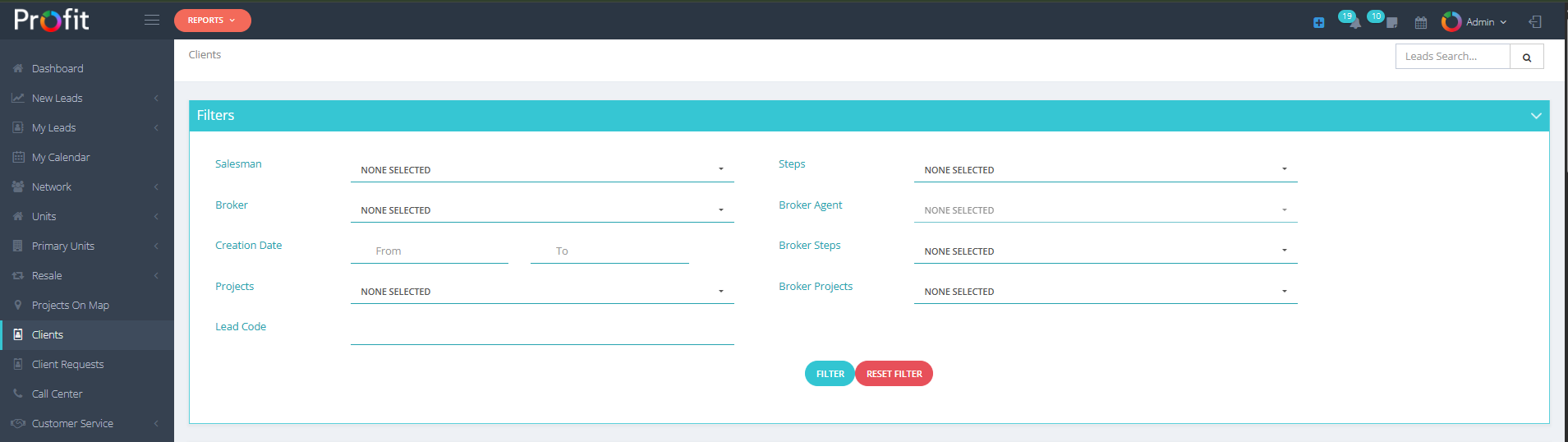
Clients Filter Interface

واجهة أزرار تصفية العملاء